

Cloud PACS
A cloud PACS that connects your team.
X-rays matched to the right patient, shared securely, reported together and available where you already work. Fewer clicks in the working day, access from anywhere, and no server of your own to look after.
- Nothing for IT to do
- From CHF 99 a month
- Hosted in Switzerland
Partners









Specialties
Where a cloud PACS pays off most
Shaped around the way medical and dental practices actually work.
-
Orthopaedic practices
High-resolution imaging for a confident diagnosis.
-
Dental practices
A short path from the exposure to the record.
-
Group practices and medical centres
Imaging across every site, with nothing for IT to run.
-
Sports medicine
A fast read when the treatment decision cannot wait.
-
Cardiology practices
ECG and imaging side by side instead of in two systems.
-
Oncology practices
Years of follow-up images archived and back on screen in seconds.
Your specialty is not here? Tell us how you work and we will look at it.
The problem
Why so many PACS solutions slow you down
Not because imaging itself is hard, but because everything around it eats into the day. It costs your team clicks, patience and often money, and it does so every day.
-
Importing by hand
Studies from outside have to be downloaded, imported and filed under a patient.
-
The same search twice
Images live apart from the practice software, so you look the patient up once there and once here.
-
Sharing the hard way
It goes out on a CD, through a portal or as an email attachment, when a link would do.
-
What it costs to run
Installation, updates, maintenance and hardware add up to a line in the budget that rarely shrinks.

The solution
How Unomed takes the work out of handling images
Images where the decision is made: there when you need them, clearly ordered, easy to pass on.
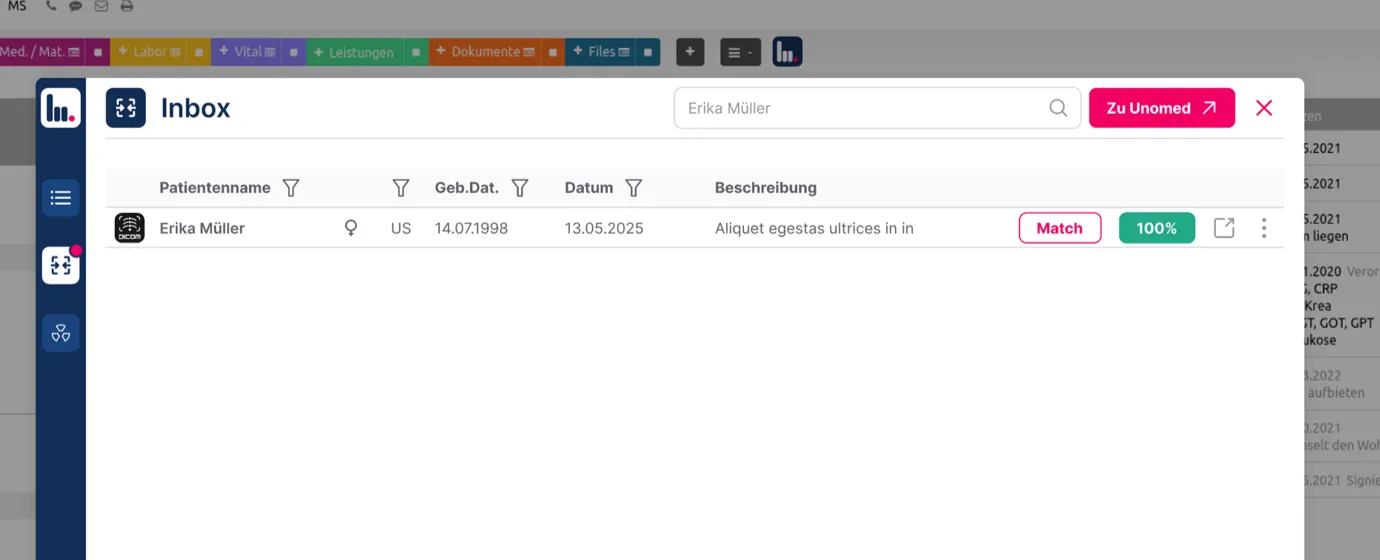
PACS inbox
Images from outside, with nothing to import or file.
Studies from radiology institutes or hospitals arrive straight in the PACS inbox. No portal, no link, no CD.
- The study shows up in the inbox the moment it arrives.
- Unomed suggests the patient it belongs to, even where the name is spelled differently or the record exists twice.
- You confirm with one click, or pick someone else.
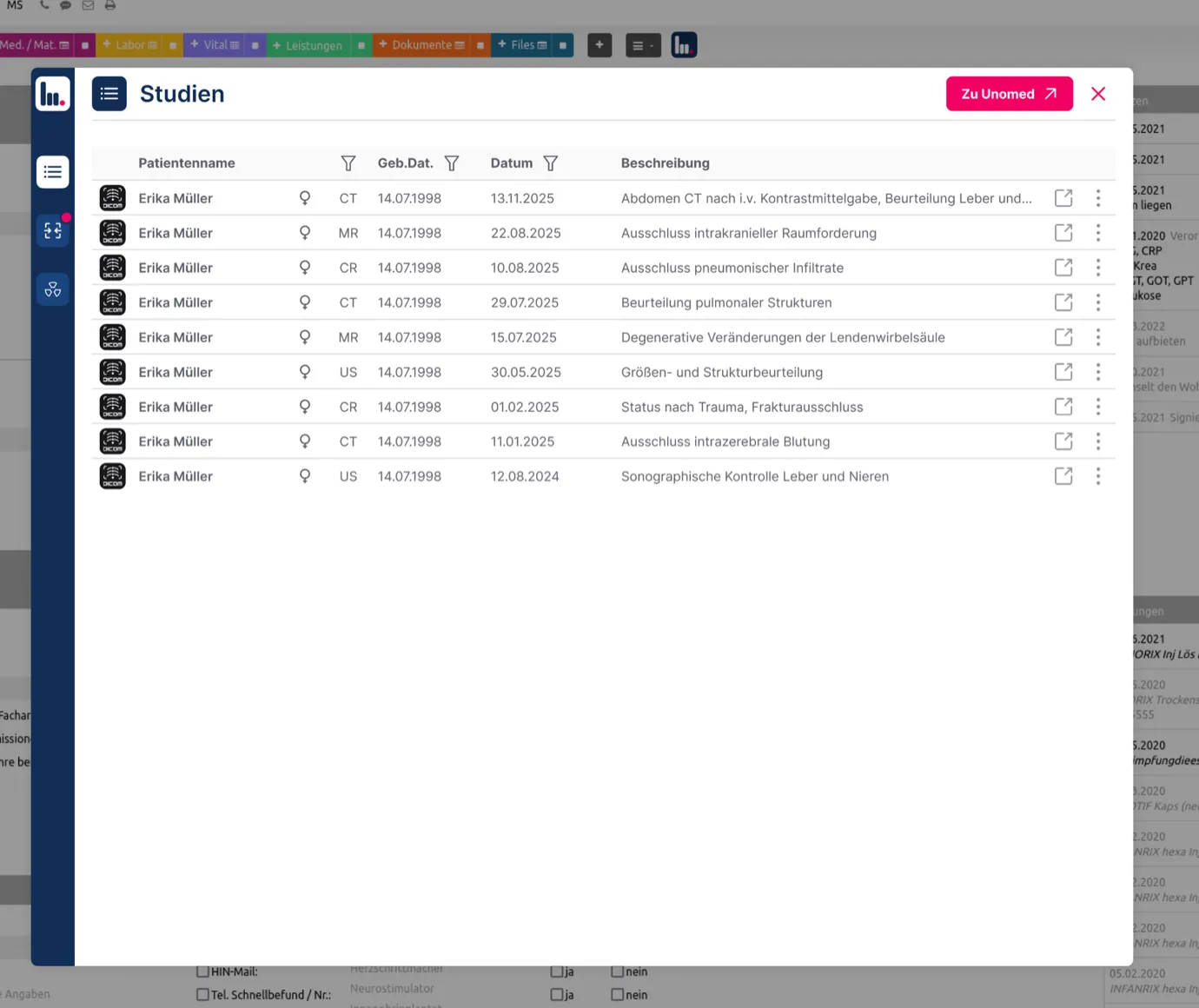
Archive
Every image in one place, safely kept
- Images and studies archived centrally, whether they came from inside or outside.
- History and prior images on screen in seconds.
- A clear order instead of scattered files and portal logins.
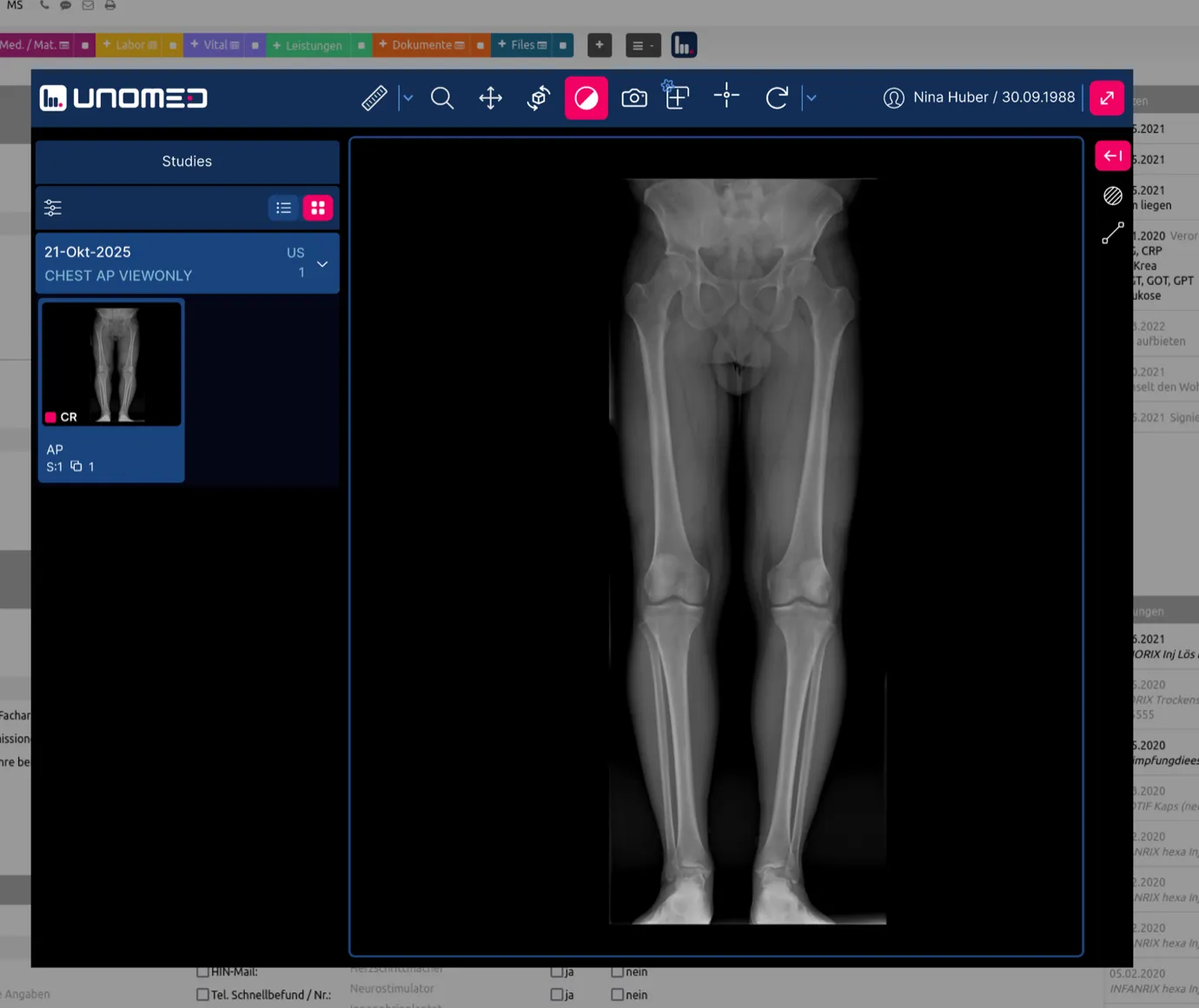
Assignment
Images filed under the right patient
- Images appear in the patient record, not in a second program.
- Open them from your practice software or straight in the browser.
- No searching twice, nothing that has to be carried across by hand.
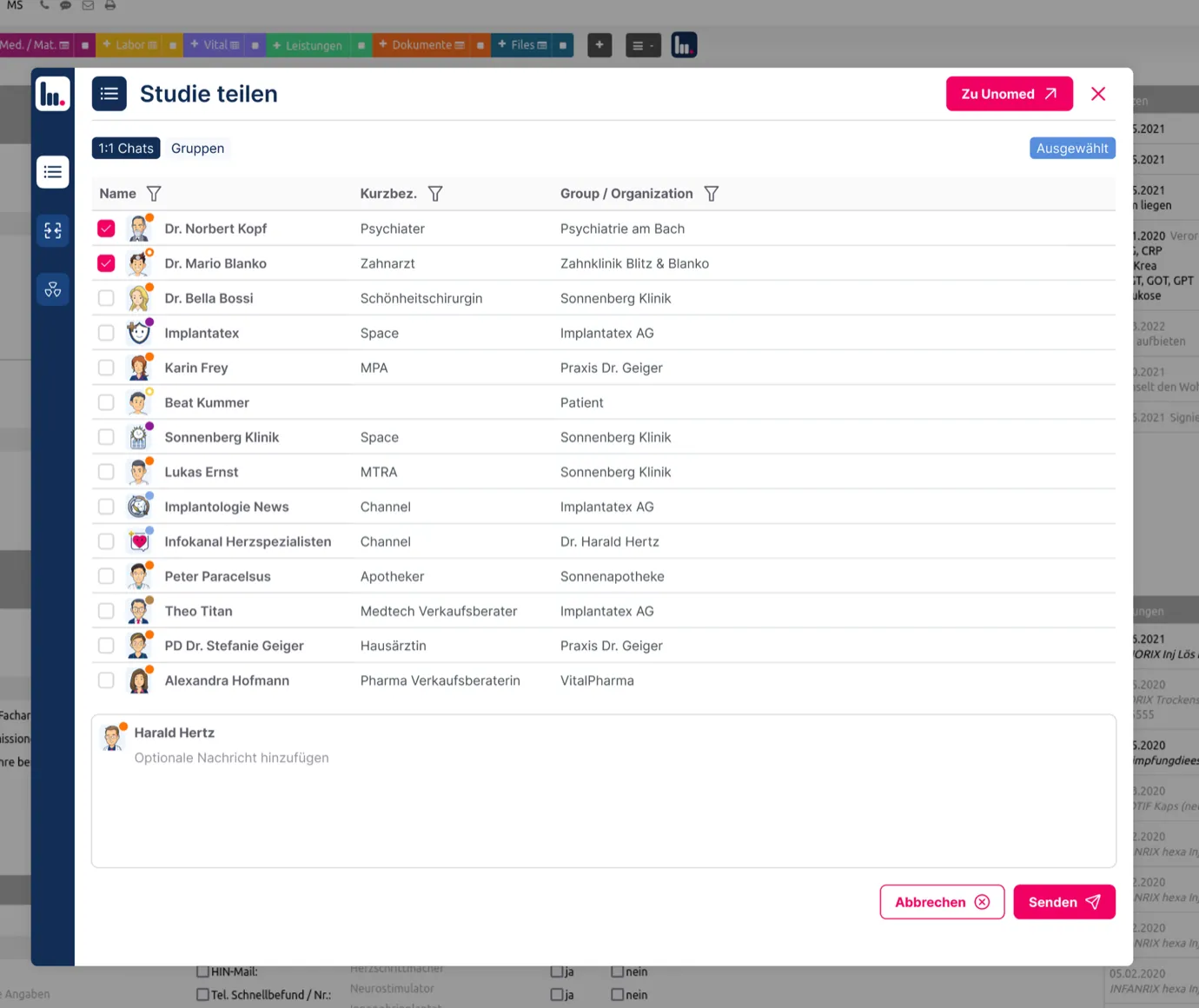
Sharing
Sharing made simple
- Share securely with colleagues, referrers and patients.
- Recipients reply in the case chat itself.
- CDs, portals and email attachments are behind you.
How it fits together
One path, from the machine to the referrer.
Unomed sits between your image sources and everyone who needs the images afterwards. What happens in between, you set up once.
-
Messenger it
Your own modalities connect through the cloud connector, an existing PACS or RIS through the Radiology Bridge. Whoever made them, with no CD and without changing the systems you run.
-
Store it
Studies from inside and outside sit together in certified Swiss data centres. Storage grows with you, roles and permissions apply per person, and you can pull your archive back out as DICOM at any time.
-
View it and pass it on
The viewer runs in the browser with nothing installed. Images appear in the patient record instead of a second program, and sharing happens by link and case chat instead of by CD.
Route in
-
Your modalities, your on-site PACS
Cloud Connector
The device sends by DICOM, like to a second printer
-
Institute, hospital, partner practice
Radiology Bridge
One site supplies any number of practices by autorouting
-
Referrers, colleagues, patients
Messenger and guest link
The study as an attachment, the guest replies in the same window
-
CD, USB stick, DICOM folder
Upload in the browser
No extra software, plus the upload form for referrers
-
Third-party software, practice and hospital systems
Medical API
DICOMweb, one key per application
Unomed cloud
Unomed Cloud PACS
PACS inbox
The study appears, you confirm the match
Archive
Vendor-neutral, DICOM, Swiss data centres
Route out
-
Your team, at every workstation
Viewer in the browser and the app
Nothing to install, no copy left on the device
-
The physician in the consultation
Your practice software
A button in the patient record, no second patient search
-
Colleagues, institutes, referrers on Unomed
Messenger and case chat
Question, answer and images stay together
-
Patients, second opinions, referrers without an account
Guest link
The recipient needs nothing but a browser
-
Your existing archive, your backup
Local copy, on-site PACS
The Cloud Connector works in both directions
-
Changing provider, your own software
DICOM export and Medical API
Complete, at any time, in the standard format
- Route in
- Inbox and archive in Switzerland
- Route out
What you already run stays: the Radiology Bridge connects an existing PACS rather than replacing it. Unomed Flows builds on the same archive, for the workflows around the images.
Unomed works on top of the practice system you already use, with no integration to build. See the systems we support
Integration
Works with your practice system
Unomed works in any web-based practice system. It runs in the browser, and that is exactly where Unomed connects, without your vendor having to lift a finger.
16+ systems 6 of them official partners
-
 Swiss-MR Partner
 -
 Axenita Partner
 -
 inSuite Partner
 -
 Nereida Partner
 -
 ePaad Partner
 -
 roaadent Partner
 -
 E-PAT
E-PAT -
 curaMED
 -
 Rockethealth
 -
 MediCloud MED
 -
 Pracmedio
 -
 E-Medicus
 -
 Medi Online
 -
 Denteo
 -
 HealthAdvisor
 -
 Latido
We work with these vendors officially.
Your system is missing? Tell us and we will look into it.
-
> 60 %
less work assigning studies that come from outside
Internal benchmark
-
> 50 %
cheaper than comparable solutions
Internal benchmark
-
100 %
hosted in Switzerland, under the Swiss Data Protection Act
Contractually guaranteed
Benchmarks from customer projects, not an independent measurement.
Voices from practice
What our users value most.
-
The secure exchange of X-ray images alone will make the work easier

Hirslanden Klinik Birshof
-
As the first practice software with a Unomed integration, we are making a clear commitment to modern, connected communication

Managing Director, Swiss Medical Record
-
With Unomed I finally have a direct, secure line to the physicians who refer to me

CEO medfit
-
Unomed's AI features make documentation easier, faster and more secure

Dipl. med. Evmorfia Pechlivanidou
Resident physician
-
Unomed is the ideal way to organise my sports teams

Berit Sportclinic
-
The cloud PACS runs stably and reliably, and we are very happy with it overall

Rüti ZH
Is Unomed PACS right for your practice?
Find out in a short conversation, with no obligation and nothing to prepare.
No IT knowledge needed, no licence costs hidden in the small print.
Security
Secure, DICOM-compliant, and yours to control.
Your image data stays your image data. That holds on the day you leave Unomed as well.
-
Hosted in Switzerland
Stored and processed in certified Swiss data centres, under the Swiss Data Protection Act.
-
Encrypted in transit and at rest
Everything is encrypted on the way and in the archive, and the viewer runs in the browser with nothing installed.
-
DICOM-compliant, yours to export
Your archive sits in the standard format. Take it out as DICOM whenever you want.
-
No lock-in
No proprietary containers, no project just to leave. You keep your options open.
Price
Professional imaging, without the project
Unomed gets the most out of your imaging, with no activation fee and no minimum term.
Cloud PACS
from CHF 99 a month
- Images and studies in the Swiss cloud
- Storage grows with you, no new contract
- Built-in DICOM viewer
- Or the DICOM viewer of your choice*
- Send images by chat
- Cloud connector for the practice network included
- Works with your practice management system
* The OHIF viewer is the default. We connect others on request.
Getting started
Four steps to your cloud PACS
From the image source to sharing, without an IT project.
-
Messenger
- Messenger DICOM devices and image sources once
- Set up through the cloud connector
- Whoever made your equipment
-
Store
- One archive for studies from inside and outside
- History and prior images close at hand
- Roles and permissions per person
-
Find
- Open it from your practice software or in the browser
- Patient and study found straight away
- Nothing carried across by hand
-
View and share
- Viewer in the browser, nothing to install
- Share with colleagues, referrers and patients
- Questions answered in the case chat
What it costs to get going
Up and running without an expensive IT project
What it typically takes, from switch-on to day-to-day running.
| Item | Unomed Cloud PACS | A classic PACS project |
|---|---|---|
| Hardware and servers | Nothing to install on site | Server and storage on the premises |
| Setting it up | An engineer only if you need one | Setup fee, engineer, licences |
| Running it | Billed for what you actually use | Maintenance contract |
| Updates | Included | In the maintenance contract |
| Backups | Included | In the maintenance contract |
| Migration (optional) | Our team brings your existing archive across | Charged by the hour |
| How long it takes | 1 to 3 days | 30 to 120 days |
Guide figures. What it actually takes and costs depends on how many image sources, sites and interfaces are involved, and on how much data there is.
Common questions about Unomed Cloud PACS
Why is Unomed's PACS cheaper than other solutions?
Because it is cloud software that grows with the practice, rather than a server you have to house and look after. The data sits encrypted in certified Swiss data centres, which takes most of the maintenance cost and IT work out of the picture.
How do I share DICOM studies with someone else?
You share them in the Unomed messenger, encrypted and without a second tool. Recipients do not need an account: anyone who is not registered gets a time-limited guest link by email, and anyone who is sees the study in the messenger.
How does patient matching work?
If the DICOM order started from the patient record, there is nothing to match, the assignment is already settled. In every other case Unomed suggests the patient it belongs to, even where the name is spelled differently or the record exists twice. Confirming it is your call.
Which devices can I connect to the PACS?
Any DICOM-capable modality, so ultrasound, X-ray or MRI. The Unomed cloud connector that comes with it handles the connection.
Can I bring my existing PACS data across?
Yes. Existing DICOM data or whole archives can be migrated. Our team helps with the connection.
Which DICOM viewers can I use?
The OHIF viewer from the Open Health Imaging Foundation as standard. We connect others when a customer asks for them.
Can I open images from my practice software?
Yes. Unomed opens the study in the built-in DICOM viewer, with no plugin and no separate program. It hooks in through a link or a button in your primary software.
Do I need extra hardware or plugins?
No. Using it takes neither special hardware nor plugins. To connect your equipment, our cloud connector is installed once in the practice network.
How secure is the PACS?
All data is transmitted encrypted and stored in certified Swiss data centres under the Swiss Data Protection Act. The built-in DICOM viewer is zero footprint: it runs in the browser and leaves nothing behind.
Is artificial intelligence used in the PACS?
Yes, when studies from outside are assigned. The AI suggests which study belongs to which patient; you confirm it. That saves time and cuts down on studies filed under the wrong name.
Can I try the PACS first?
Yes — the easiest way is a no-obligation demo; you see the PACS in the browser, with no installation. There is no free version of the PACS; every plan comes without an activation fee and is cancellable monthly. What is permanently free is Unomed Connect, the messenger for sharing studies.
Cloud PACS by specialty:

Next step
Is Unomed PACS right for your practice?
Find out in a short conversation, with no obligation and nothing to prepare.