

For Swiss medical practices
A BlueConnect alternative: review and file reports.
Unomed as a BlueConnect alternative: Connect supports document exchange; Flows reads reports and prepares patient matching and filing in your practice software. Your team reviews and approves. The right modules depend on your current workflow.
A comparison by Unomed, the provider of the alternative presented here. BlueConnect is a product of BlueCare AG.
Reviewed: 6 November 2026
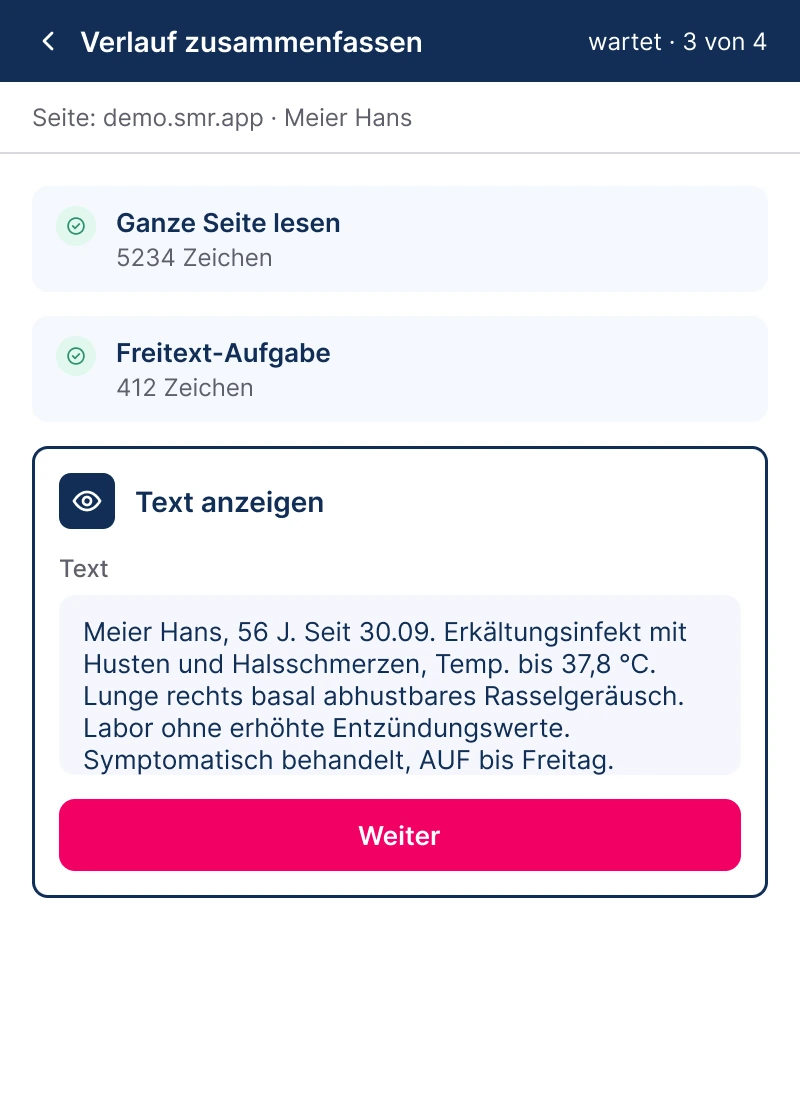
An original view of Unomed Flows
The alternative you are looking for
From incoming document to reviewed filing.
BlueConnect by BlueCare supports document exchange, approval and text recognition. To compare it with Unomed, start with your workflow: what arrives, who reviews it and what should happen in the practice system?
Exchange documents and questions
Connect brings together encrypted team and referrer communication. Forms are added according to the modules you need.
Explore Unomed MessengerRead and assign reports
Flows reads details from documents and prepares assignments and further steps. The practice reviews suggestions before information is transferred or documents are filed.
Explore AI automationKeep your practice software
For supported workflows, Flows works through your practice software interface. We assess the system, version, access and intended steps for your practice.
Check integrationsFeature comparison
BlueConnect and Unomed: which components do you need?
The Unomed column distinguishes communication from automation. Features in additional modules are not automatically included in the free messenger.
| Your requirement | BlueConnect, according to BlueCare | Unomed Connect and Flows |
|---|---|---|
| Document exchange | Sending, receiving and approval. | Connect for encrypted messages and documents within the team and with referrers. |
| Process documents | Text recognition for filing. | Flows prepares content, patient assignment and filing steps. Your team reviews and approves. |
| Practice system integration | Optional PIS integration module. | Flows for supported practice workflows. Steps and system versions are assessed in advance. |
| Billing assistance | Optional additional module. | An equivalent replacement is not promised as standard. Required billing steps must be assessed. |
| Pricing model | Base subscription per doctor; consider modules and setup. | Connect is free up to the published team limit. Flows and other modules are offered separately. |
BlueCare: current BlueConnect offering · Reviewed: 6 November 2026
The comparison covers the tasks listed. Confirm current scope, supported systems and network agreements with the respective provider.
BlueConnect, HIN and your practice software
Receive HIN mail. Process the report in your PIS.
If you use BlueConnect with HIN, distinguish secure delivery from the work performed on a document after receipt. We assess both steps separately when planning a switch.
Your incoming channel
We establish how reports from your HIN mailbox can enter the intended workflow. Existing accounts, permissions and communication partners are part of the assessment.
Preparation with Flows
Flows can read a report and prepare patient matching, document naming and filing steps. Supported channels and PIS versions are checked in advance.
Approval by your practice
Your team checks the match and content. Unclear information is clarified; agreed steps are applied only after approval.
This does not replace your HIN membership or access credentials. A particular HIN connection or a complete replacement of BlueConnect features is confirmed only after assessing your workflow.
Explore report workflows with AI automationPricing and scope
What does a BlueConnect alternative cost?
Check BlueConnect costs
For BlueCare, practice size, modules and any network agreements matter. Refer to the provider’s current price list.
BlueConnect pricing at BlueCareChoose the right Unomed components
Connect and automation serve different purposes. Published Unomed prices are listed by product line; we assess the required scope from your workflow.
- Unomed Connect
- Free for up to 25 people
- Unomed Flows
- from CHF 149 per monthfor practices with 1–3 doctors
All prices in CHF per month, excl. VAT. Any one-time setup costs are shown in the quote.
These are individual starting prices, not a total price for replacing BlueConnect. Larger practices and the specific setup scope require a quote.
A free messenger does not mean free automation or a complete replacement for every BlueConnect module.
Before switching
Four questions to answer first.
Which work should be replaced?
Sending, approving, assigning or filing documents, or assisting billing: list the steps you actually perform with BlueConnect.
Which systems and partners are involved?
Identify your practice software and version, incoming channels and key communication partners. We assess the specific connection.
Which records and agreements remain relevant?
Check existing records, access rights, network agreements and contract terms. Archive transfer and parallel operation can be planned if needed.
How do you assess the fit?
We walk through an anonymised example with your team, from receipt and suggestions to approval, before assessing suitability.
Questions about a BlueConnect alternative
Is Unomed an alternative to BlueConnect?
Unomed can be an alternative for selected communication and document workflows. Connect handles communication; Flows supports reading and preparing further work in practice software. Whether this replaces your BlueConnect use depends on modules, systems and required workflows.
Do we need to change our practice software?
A system change is not intended for supported Unomed workflows. We first assess your practice software, version, required access and steps. This is not a blanket guarantee of compatibility with every system.
Can Unomed file incoming medical reports automatically?
Flows can read details from medical reports and prepare assignments and agreed filing steps. Your team checks the suggestions and approves their application. The workflow is configured and tested for the practice.
Can I keep using my HIN mailbox with Unomed?
Your existing HIN mailbox can be the starting point for planning a document workflow. We assess access, incoming channels, document types and supported practice software. Flows prepares further processing; your team reviews and approves. HIN membership and access remain separate.
Is the alternative free?
Unomed Connect is free up to the published team limit. Flows and other modules have their own scope and prices. Compare the entire workflow you need, not only the entry price.
How is data handled by Unomed?
The Swiss Unomed offering is hosted in Swiss data centres. The practice controls access and approvals. Data processing for the specific workflow is agreed during setup; further information is in the privacy policy.
How can we compare BlueConnect and Unomed in a demo?
Describe the work you perform with BlueConnect, your practice software and incoming channel. We walk through an anonymised document example from receipt to approval and assess the scope you need.
Does Unomed fit your current BlueConnect workflow?
For a concrete demo, start with your practice software, BlueConnect modules and incoming channel. Together we review an anonymised example through to approval and clarify scope and costs.