

For Swiss medical practices
Document management for medical practices: inside your practice information system.
Document management in a medical practice means that every incoming document sits with the right patient, consistently named, in the patient record. Unomed reads reports, results and referrals, suggests the patient and file name and prepares filing in your practice information system (PIS). Your team reviews and approves. You do not need to introduce a separate document management system (DMS) for this.
- Keep your practice software
- Approved by your team
- Data in Switzerland
Reviewed: 13 November 2026
Original view of the Unomed extension
Definition
What is document management in a medical practice?
Document management covers everything that happens to a document between arrival and archive: capturing it, matching it to the patient, naming, filing, finding, sharing and retaining it. In companies this is the job of a document management system, or DMS.
In a medical practice, clinical documents belong in the patient record, and the patient record lives in the practice information system (PIS), also called practice software. Document filing already exists there. The work comes before it: someone opens each PDF, reads it, looks up the patient, names the file and puts it in the right record. This is the part Unomed prepares.
Five tasks every practice has to solve
Bundle the inbox
Referrals, medical reports and lab results arrive by email, HIN, post and fax. One shared digital inbox keeps anything from being left behind.
Match to the patient
Name, date of birth and sender decide which record a document belongs to. Mix-ups are the biggest risk at this step.
Name consistently
Date, patient and document type in the file name make a document easy to find years later, for the whole team.
File in the patient record
The document belongs in the record in the practice information system, not in a folder on a drive or a personal mailbox.
Share and retain
Reports go to referrers in encrypted form. The patient record stays available for the statutory retention period.
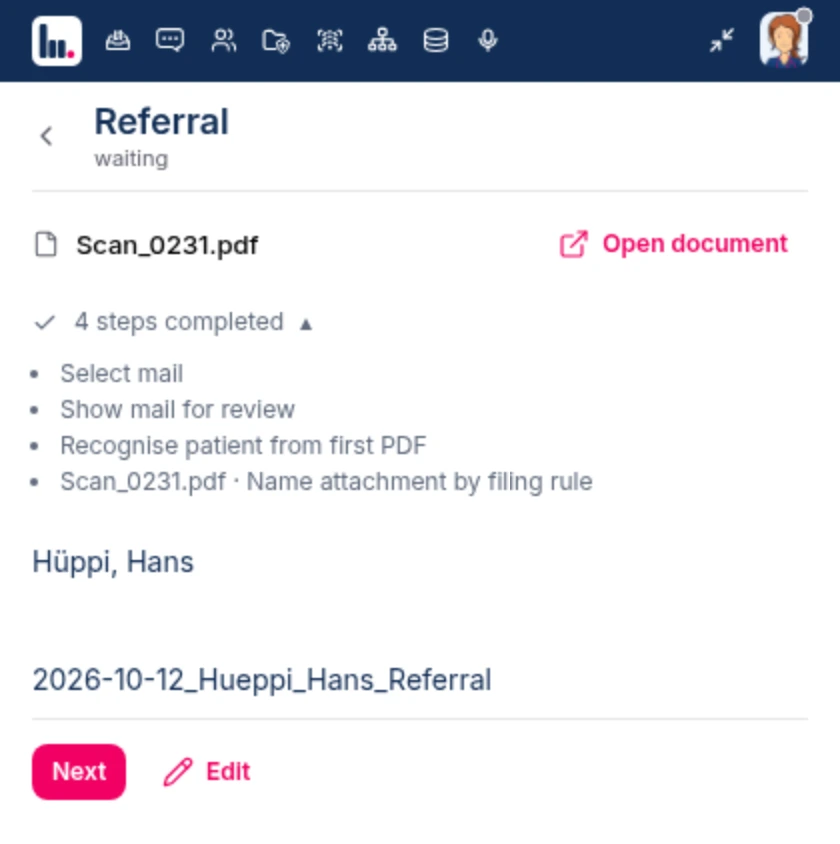
An example from Unomed Flows
From the inbox to the patient record
Unomed reads, names and matches. Your team confirms. Schematic illustration with fictional data.
 Hans Hüppi







Workflow
From arrival to filing in the record.
The workflow is configured and tested for your practice. These four steps stay the same.
Arrival
Attachments from your practice mailbox reach the Unomed inbox through the AI Inbox. How documents from the HIN mailbox, scanned paper mail and items from other channels get there is clarified during setup.
Read and match
Flows reads the document type, date and patient details and suggests the matching record. An unclear match is resolved before filing.
Name and prepare
The file name follows your convention. Flows prepares filing in the record and works on the interface of your practice information system, without access to its database.
Review and approve
Your team checks the match and the content. The prepared steps are applied only after approval. Every run is logged.
AI results can be incomplete or wrong. That is why Unomed deliberately does not offer filing without approval.
See AI automation with FlowsComparison
DMS, practice information system, or both?
Three routes lead to orderly document handling. Which one fits depends on where your clinical documents should end up and who does the matching.
| Question | Separate DMS | Filing in the PIS alone | PIS with Unomed |
|---|---|---|---|
| Where is the document stored? | In its own archive beside the patient record. | In the patient's record. | In the patient's record in your PIS. |
| Who matches it to the patient? | Your team. Whether the DMS knows the patients in the PIS depends on the integration. | Your team, document by document. | Flows suggests patient and record. Your team reviews and approves. |
| Who names the file? | Rules or manual work, depending on the system. | Your team, by hand. | Flows, following your convention, with approval. |
| What changes day to day? | One more system with its own search, permissions and training. | Nothing. The effort remains. | The PIS stays. A browser extension is added. |
| What is it suited to? | Contracts, quality management, HR and accounting records. | A few incoming documents a day. | Many incoming reports, results and referrals. |
The columns describe typical approaches, not individual products. For administrative records outside the patient record, a DMS can remain useful. Unomed replaces neither such a DMS nor your practice information system.
Document types
Which documents your practice can organise this way.
Start with the document type that reaches you most often. Others follow once the first workflow is in place.
Referrals
Flows reads patient details and the referrer from the PDF and prepares entry in the practice system and the confirmation of receipt.
See Flows examplesMedical and discharge reports
Incoming reports are read, named and matched to the record. For your own reports, dictation becomes a structured draft.
Medical report: structure and templateLab results
Possible as a workflow: match lab results to the patient, flag abnormal values and sort by urgency.
See Unomed FlowsImages and DICOM studies
X-ray, CT and MR studies belong in the PACS, the report in the patient record. In Unomed PACS you open studies in the viewer and share them securely with referrers.
See Unomed PACSShared practice storage
Documents, images and DICOM studies that you share within the team or with partners are stored encrypted in Cloud Storage in Swiss data centres.
See Cloud StoragePractice information systems
Which practice information systems does this work with?
Unomed works on the web interface of your practice software, just as your medical practice assistant does. Supported workflows need no dedicated interface from the vendor. These web-based systems are on the list today:
- Swiss-MRPartner
- AxenitaPartner
- inSuitePartner
- NereidaPartner
- ePaadPartner
- roaadentPartner
- E-PAT
- curaMED
- Rockethealth
- MediCloud MED
- Pracmedio
- E-Medicus
- Medi Online
- Denteo
- HealthAdvisor
- Latido
We work officially with the vendors marked as partners. The list gives an overview. We check which steps are possible in your system and version for your workflow. For desktop programs without a browser interface, talk to us and we will assess the connection.
Modules and prices
What you need for document management.
Unomed is modular. These three modules matter for document filing. You take what your workflow needs.
AI Inbox
from CHF 49 per monthfor practices with 1–3 doctors
Brings attachments from the practice mailbox into the inbox and suggests the patient.
Flows
from CHF 149 per monthfor practices with 1–3 doctors
Reads documents, names them and prepares filing in the practice information system.
Connect
Free for up to 25 people
Encrypted messages and documents within the team and with referrers.
All prices in CHF per month, excl. VAT. Any one-time setup costs are shown in the quote. Entry prices, not a total price. Together we clarify which modules your workflow needs. Larger practices receive a quote.
Data protection and retention
Patient data in Switzerland, the patient record in your system.
Under the Swiss Federal Act on Data Protection (FADP), health data is sensitive personal data. For document management this means clear access rights, traceable steps and a storage location you know.
Hosted in Switzerland
Unomed is hosted in Swiss data centres. Your patient data is not used to train AI models.
Only as much as needed
Only the necessary excerpt is transmitted, not the whole record.
A suggestion, never an action
Unomed proposes, your team approves. Every suggestion can be changed or discarded.
Verifiable afterwards
Every run is logged. You can see what was read and what was written.
Retention duty: 20 years as a guide
According to the FMH guide, the patient record must be kept for 20 years after the end of treatment because of the limitation period in liability law. Cantonal health laws require at least 10 years; the law at your practice location is decisive. Unomed prepares filing in your practice information system. Your existing rules for retention, backup and access continue to apply there.
FMH: guide to retention and archiving, version 03/2023 (PDF, in German) · Reviewed: 13 November 2026
Getting started
Introducing document management: five questions before you start.
Which documents arrive, and how often?
For one week, count referrals, reports and results per channel. The most frequent case becomes your first workflow.
Where do documents arrive?
Practice mailbox, HIN, scanner, fax: note who empties which channel today, and how often.
What is a document called?
Agree on a convention, for example date, patient and document type. It then applies to people and to Flows.
Who reviews and approves?
Decide who checks matches and who decides when something is unclear.
What can your practice information system do?
Note the system and version. We check which steps can be prepared on its interface.
Questions about document management in medical practices
Does a medical practice need its own document management system (DMS)?
For clinical documents, usually not: they belong in the patient record, which lives in the practice information system. A separate DMS can be useful for contracts, quality management and HR records. What matters is that incoming reports and results reliably end up with the right patient.
What is the best document management system for a medical practice?
That depends on the records. Classic DMS software with retention rules suits administrative documents. For reports, results and referrals, the system that holds the patient record is decisive, which is your practice information system. Unomed adds the reading, naming and matching of incoming documents.
Does document management work with our practice information system?
Unomed works on the web interface of the practice software and needs no vendor interface for supported workflows. The list includes web-based systems such as Swiss-MR, Axenita, inSuite and curaMED. We check the system, version and intended steps for your practice. For desktop programs without a browser interface, we clarify the connection with you.
Can Unomed file incoming medical reports and lab results automatically?
Flows reads the details, suggests the patient, file name and record and prepares filing. It is applied after approval by your team. Unomed deliberately does not offer filing without review: AI results can be wrong, and responsibility for the patient record stays with the practice.
How long do documents have to be kept in a medical practice?
According to the FMH guide, the patient record must be kept for 20 years after the end of treatment. Cantonal health laws require at least 10 years; the law at the practice location is decisive. Business records such as invoices must be kept for 10 years under the Swiss Code of Obligations.
How do we back up documents and patient data in a medical practice?
The patient record is backed up with your practice information system; clarify backup and recovery with its vendor. Unomed is hosted in Swiss data centres. In addition, define who may access what, and avoid storing documents in personal mailboxes or on individual devices.
What is the difference between document management and clinical documentation?
Clinical documentation records the treatment: history, findings, diagnoses and progress. Document management organises the files that are created along the way or arrive from outside. Both meet in the patient record. Unomed supports both sides: Flows for filing, Dictation and Ambient AI for writing.
What does document management with Unomed cost?
The AI Inbox costs from CHF 49 and Flows from CHF 149 per month, each for practices with 1 to 3 doctors and excluding VAT. The Connect messenger is free for up to 25 people. Larger practices receive a quote.
How many documents does your team file by hand today?
For an assessment we only need your practice software, the incoming channels and an anonymised sample document. We show the workflow from arrival to approval and clarify scope and costs.